Home > Products > Automotive Test Equipment > Fvdi Svci 2021 2021 Auto Key Programmer Abrites Commander Include Fvdi 2021 2021 2014 Functions Vvdi IMMO for VW
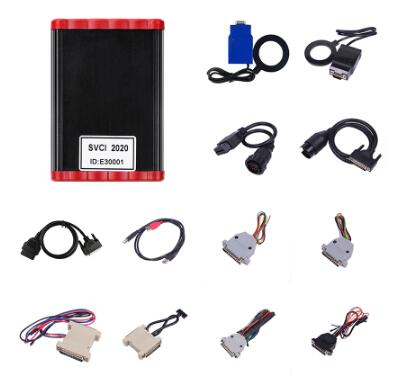
Fvdi Svci 2021 2021 Auto Key Programmer Abrites Commander Include Fvdi 2021 2021 2014 Functions Vvdi IMMO for VW
2020 SVDI Diagnostic Tool with Full 19 SoftwareHightlights:Does not require activation; Won't be locked.Adds Extar software For Suzuki, For JLR and For Daihatsu(other FVDI does not support)Support all 19 software till year 2019Adds 19 software than FVDI 2018The difference between SVCI 2020 and ......
Send Inquiry
Product Description
2020 SVDI Diagnostic Tool with Full 19 Software
Hightlights:
Does not require activation; Won't be locked.
Adds Extar software For Suzuki, For JLR and For Daihatsu
(other FVDI does not support)
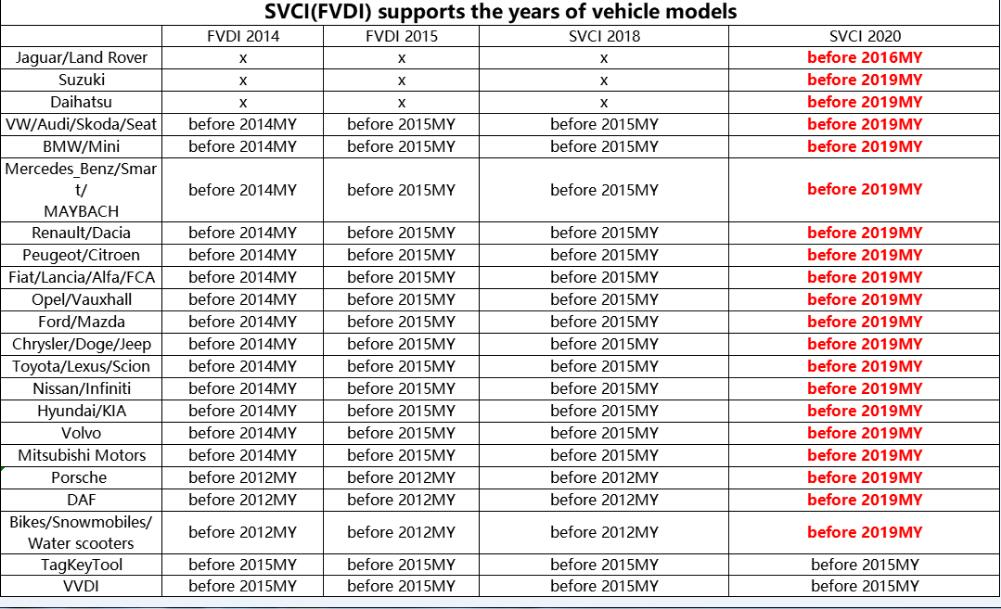
Support all 19 software till year 2019
Adds 19 software than FVDI 2018
The difference between SVCI 2020 and SVCI 2018
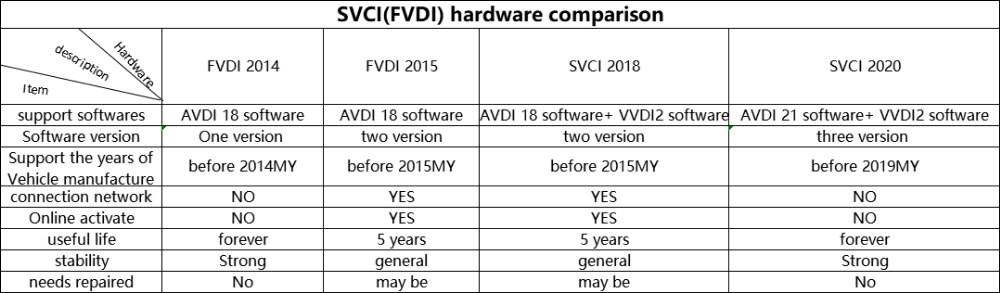
The hardware difference is that the SVCI 2020 has fewer button batteries than the SVCI 2018. SVCI 2020 does not require activation, does not lock the machine, and the serial number is not lost.
The software difference is that SVCI 2020 has 19 more software than SVCI 2018:
1. ABRITES Commander for VAG V37.0,
2. ABRITES Commander for BMW V10.5,
3. ABRITES Commander for Mercedes V10.4
4. ABRITES Commander for Bikes V2.0
5. ABRITES Commander for Chrysler V3.4
6. ABRITES Commander for Daihatsu V1.4
7. ABRITES Commander for FIAT V7.6
8. ABRITES Commander for Ford V7.7
9. ABRITES Commander for Hyundai V4.4
10. ABRITES Commander for JLR V2.6
11. ABRITES Commander for Mitsubishi V3.7
12. ABRITES Commander for Nissan V5.7
13. ABRITES Commander for OPEL V7.5
14. ABRITES Commander for Porsche V7.1
15. ABRITES Commander for PSA V6.3
16. ABRITES Commander for Renault V7.4
17. ABRITES Commander for Suzuki V1.2
18. ABRITES Commander for Toyota V11.4
19. ABRITES Commander for Volvo V6.2
These 19 softwares are the latest software, support the fault diagnosis of the new model of 2019, clear the fault code, read the data stream, action test and other basic functions, and currently do not support special functions.
Among them, For Suzuki, For Daihatsu contains special features.
SVCI 2020 software installation
The CD has only one executable file. Double-click "AbritesCommanderSetup.exe" to start the installation. Do not plug the USB into the computer during the installation process. After the installation is complete, USB is connected to the computer.
SVCI 2020 quick start software usage
The SVCI 2020 Quick Start software has 42 shortcut icons, and the left mouse click on the icon to launch the corresponding software. Compared to the quick start of SVCI 2018, the activation dialog is not displayed after clicking the icon.
The last icon is the firmware upgrade program, click to launch the firmware upgrade program. You must be connected to the Internet to download the latest firmware. After downloading, click Upgrade to update the firmware.
After clicking the icon, the program icon of the dongle appears in the tray in the lower right corner of the computer. The dongle program cannot be quit during the software running.
Hightlights:
Does not require activation; Won't be locked.
Adds Extar software For Suzuki, For JLR and For Daihatsu
(other FVDI does not support)
Support all 19 software till year 2019
Adds 19 software than FVDI 2018
The difference between SVCI 2020 and SVCI 2018
The hardware difference is that the SVCI 2020 has fewer button batteries than the SVCI 2018. SVCI 2020 does not require activation, does not lock the machine, and the serial number is not lost.
The software difference is that SVCI 2020 has 19 more software than SVCI 2018:
1. ABRITES Commander for VAG V37.0,
2. ABRITES Commander for BMW V10.5,
3. ABRITES Commander for Mercedes V10.4
4. ABRITES Commander for Bikes V2.0
5. ABRITES Commander for Chrysler V3.4
6. ABRITES Commander for Daihatsu V1.4
7. ABRITES Commander for FIAT V7.6
8. ABRITES Commander for Ford V7.7
9. ABRITES Commander for Hyundai V4.4
10. ABRITES Commander for JLR V2.6
11. ABRITES Commander for Mitsubishi V3.7
12. ABRITES Commander for Nissan V5.7
13. ABRITES Commander for OPEL V7.5
14. ABRITES Commander for Porsche V7.1
15. ABRITES Commander for PSA V6.3
16. ABRITES Commander for Renault V7.4
17. ABRITES Commander for Suzuki V1.2
18. ABRITES Commander for Toyota V11.4
19. ABRITES Commander for Volvo V6.2
These 19 softwares are the latest software, support the fault diagnosis of the new model of 2019, clear the fault code, read the data stream, action test and other basic functions, and currently do not support special functions.
Among them, For Suzuki, For Daihatsu contains special features.
SVCI 2020 software installation
The CD has only one executable file. Double-click "AbritesCommanderSetup.exe" to start the installation. Do not plug the USB into the computer during the installation process. After the installation is complete, USB is connected to the computer.
SVCI 2020 quick start software usage
The SVCI 2020 Quick Start software has 42 shortcut icons, and the left mouse click on the icon to launch the corresponding software. Compared to the quick start of SVCI 2018, the activation dialog is not displayed after clicking the icon.
The last icon is the firmware upgrade program, click to launch the firmware upgrade program. You must be connected to the Internet to download the latest firmware. After downloading, click Upgrade to update the firmware.
After clicking the icon, the program icon of the dongle appears in the tray in the lower right corner of the computer. The dongle program cannot be quit during the software running.
Related Category
Send Inquiry
Please Feel free to give your inquiry in the form below. We will reply you in 24 hours.